Home » Archive

Articles tagged with: Photoshop

Written By: techieDan on December 31, 2009 One Comment
Batch Resize Photos in Photoshop CS3

Most of us who snap photos usually take those pictures on the newer cameras with bigger pixels. Though the problem is sometimes we need to crop the picture or rather resize the photos for public viewing on the Internet. Yes, one can do that one by one using Adobe Photoshop, and re-size them accordingly to [...]

Written By: techieDan on September 28, 2009 4 Comments
Opening RAW photo formats in Photoshop

Surprisingly those who have installed Adobe Photoshop CS4 or own this software will have no problems accessing and opening the RAW picture format file. Here’s how to do it. As a Nikon D300 user, I have browsed through the world wide web and found that one needs to download a plugin. As of date, the current up to date version is the Camera Raw 4.3.1.

Tags: [, , ]
Written By: techieDan on July 7, 2009 One Comment
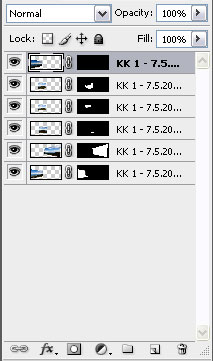
Merging Your Photos Using Photoshop CS3

You have a collection of photos and want to merge your photos together. Well, if you have a camera, and you snapped them and wanted to join them using any photo editor software to do the panaroma effect.

For now TechieDan will be teaching you how to merge photos to create a panaroma effect with simple [...]

Written By: techieDan on June 23, 2009 One Comment

Have you ever thought how Photoshop actually helped in getting the good pictures to appear on a fashion magazine. Well, most photographers used photoshop and web designers use them too.

In Adobe Photoshop we trust, though now I would like you to view a shocking true Adobe Photoshop capability which I think would be quite shocking [...]

Tags: [, ]
Written By: techieDan on November 16, 2008 2 Comments
Photoshop Showing Yellowish White

A few days back, was having problems with my Adobe Photoshop CS3 program, with the white of the application showing a tint yellow from original white. The picture was fine, opening a random jpeg file with Microsoft Paint shows it was white but opening with Adobe Photoshop shows white as yellowish tinted white.

Now what seems [...]

  Copyright © 2009 TechieDan, All rights reserved.| Powered by WordPress