Archive for January, 2008
MySQL ownership Taken Over
Written by techieDan on January 17, 2008 – 12:33 pm
Hmm.. shocking news. It seems that the free open source MySQL database has now been bought over by SUN. Yes, Sun, the creator of Java which is famous for it’s compile once run everywhere (basically platform independent).
In terms of news, with an astonishing figure of $1,000,000,000 or in literal translation 1 Billion dollars. That’s an astonishing figure. Looks like all the big players in the Internet market are buying over stuffs.
“The combination of MySQL and Sun represents an enormous opportunity for users and organizations of all sizes seeking innovation, growth and choice,” said Marten Mickos, CEO, MySQL.
Sun’s ever many Software will integrate with MySQL. The breakdown of the $1 billion can seperate in terms of $800 million in exchange of MySQL stock and approximated $200 million in other options. With this news, now not only with the long lasting partnership of Sun Microsystems and Oracle but also with an additional new database to integrate together.
“We are going to keep investing in that and keep doing that,” he said. “It is vital to our customers. It is vital to our business, but we can also use that expertise and share that expertise to optimize MySQL technology to run on Sun systems as well as Linux and Windows systems.” says Rich Green, executive Vice President of Sun Microsystems Software.
Tags: java, mysql, News
Posted in News | No Comments »
Windows XP Mod Registry
Written by techieDan on January 10, 2008 – 12:48 amSometimes we those original Windows XP on our PC but the problem is that they were installed by the vendor itself. They even go through the trouble to register it. So now that’s that, the name on the Windows XP is preset with a different user let’s say Admin. So I want to Modify the Registry for the name.
How to Change It?
Basically the names on the Windows is stored in the registry.
Click Start >> Run >> Type Regedit
Then to simplify the whole thing, search for a value name RegisteredOwner. Double click it and voila, you can change the name inside it. Click OK and then close RegEdit. In case you need verification for it, go to Help >> About in Windows Explorer and look for the changes in the name.
That’s as easy as 1-2-3.
Tags: Registry, Windows Tweak
Posted in Windows | No Comments »
Samsung SGH-P200
Written by techieDan on January 6, 2008 – 2:04 am
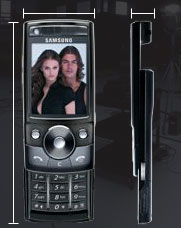
Presenting the Samsung SGH-P200, the newest phone from Samsung. Being a mobile phone by itself, it also comes with a 5MP camera inbuilt and a flash light. It comes in handy also as a MP3 Player.
Now one can surf the net using the Samsung P200 easily with Netfront Browser v3.4 which ensures ease of browsing with your page pilot and the virtual pointer. Unlike previous Samsung models, a 2.2″ LCD screen, it’s also light weight around 105g.
Currently in Malaysia, as of press time, it’s still underway. Until I get my hands on it, based on the product specifications, I must say phones are doing what the cameras, mp3 players are doing!
Specifications
————-
GPRS/EDGE/
850/900/1800/1900MHz
Dimensions
102 x 47.8 x 14.9 mm/ 105g
Battery
Li-ion 880mAh
Talk time: up to 3 hours
Standby time: 300 hours
Imaging
5 Megapixel camera with auto focus
4 X Digital Zoom
Power LED Flash
16M color 2.2″ QVGA TFT LCD
Posted in Phone, Review | No Comments »
Delicious Spaghetti
Written by techieDan on January 4, 2008 – 7:52 pmAs I am always at home, I guessed one of the best dishes to eat and deliciously is the home cooked spaghetti. Well, to me that’s more than delicious.

It’s convenient for me too. I can blog while I eat!
Click to find out about PhotoHunt!
Tags: Photohunt
Posted in Photohunt | 18 Comments »
FileZilla FTP Software
Written by techieDan on January 3, 2008 – 4:31 pmFileZilla is one of the most recommended FTP software. Well, techieDan has been using FileZilla for it’s ftp purposes. As promised that I’ll introduce a few FTP client software for users and readers of Wordpress and any webpage editor, that’s where FileZilla comes in on this post.

Basically FileZilla is an open source software distributed under the terms of the GNU General Public License. If we’re just the user just get the client download, of course you can install it on a PC if you wanted to setup a FTP server using FileZilla. Bare in mind that the server one only works on Windows platform.

If you’re still clueless on how to sign on for ftp clients, I recommend you to read this.
Tags: FileZilla, FTP
Posted in FTP | No Comments »